Sequence problems in Schedule, more image aspect ratios and faster Activity search
November 10th, 2026 (Revision 1), print this pageSee Sequence job problems directly in Schedule
We’re bringing active Sequence job problems into the Schedule page in Mediagenix On-Demand, making it easier for scheduling teams to spot issues and coordinate with content operations teams.
What’s changed?
Spot and investigate problems directly from Schedule
A yellow warning badge appears alongside the workflow status when the associated Sequence job has active problems. The completion status remains visible, so you can see both how far the workflow has progressed and whether problems have been reported.
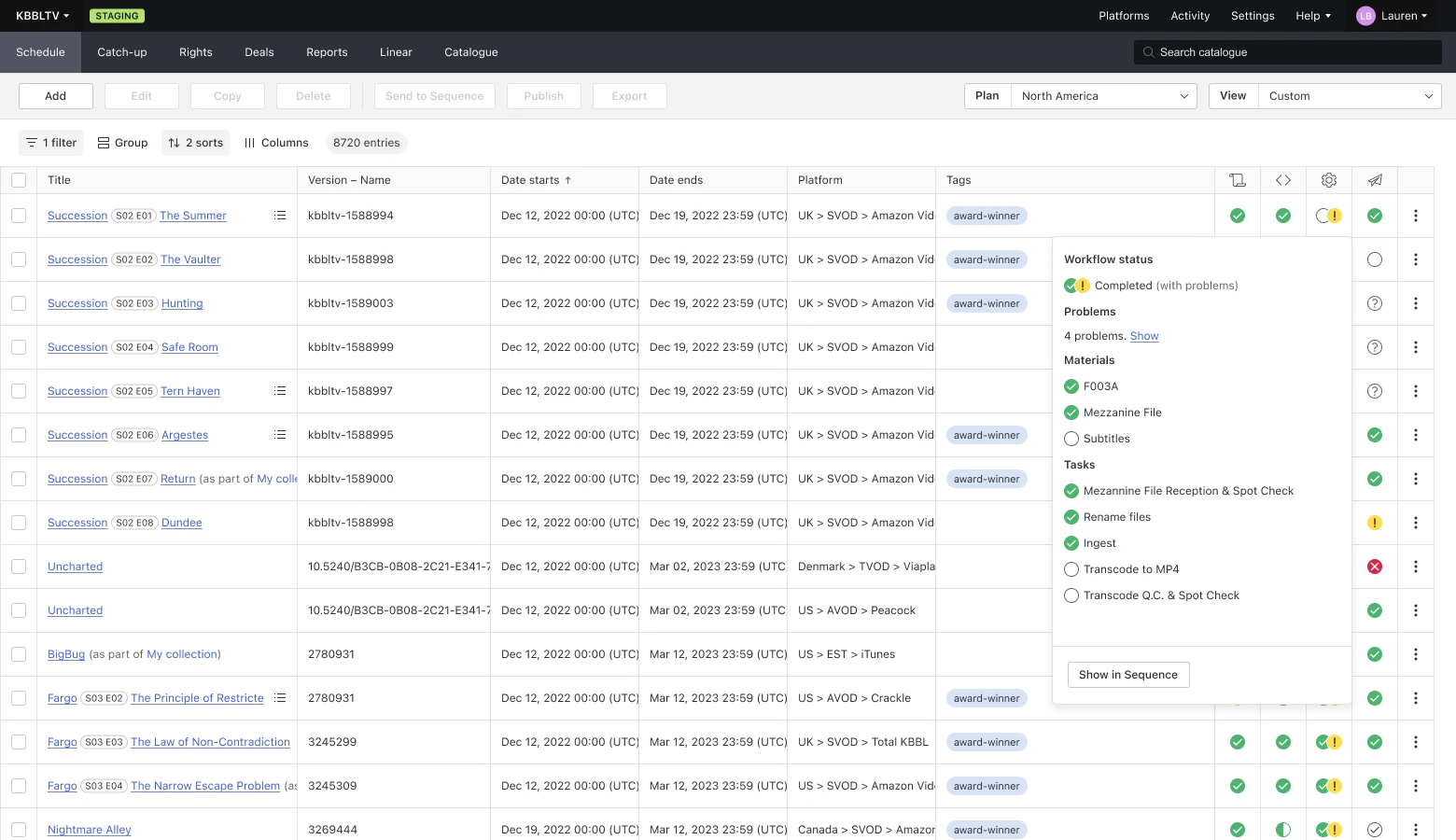
Click the workflow status to see the number of active problems, then select Show to read their descriptions alongside the materials and tasks information. To investigate further or manage the problems, select Show in Sequence to open the associated job.
You can also use the Status – Workflow filter to find workflows with or without active problems.
Why this matters
Spot operational problems directly from Schedule.
Review problem details without switching between MOD and Sequence.
Quickly find workflows with active problems, regardless of their completion status.
Give scheduling and operations teams shared visibility to coordinate follow-up.
What do I need to do?
This feature will remain optional for a few weeks, controlled through Settings. This gives your team time to agree how to use the indicators and inform users before enabling them.
Before switching it on, you might want to review any old or no longer relevant problems. You can deactivate problems in bulk in Sequence, editing up to 40 jobs at a time, or use an API script for a larger clean-up.
If your process is to ignore problems once all tasks and assets are complete, make sure users understand that the warning badge will still appear and should be read alongside the workflow’s completion status!
As usual, if you have any questions, please reach out to your Customer Success team.
More image aspect ratios for your artwork
MOD now recognises three additional image aspect ratios: 3:1, 4:1 and 16:7. Previously, images matching these formats could be classified as free. MOD can now identify them by their recognised ratio, giving integrations more useful image metadata for downstream publication.
The additional ratios are also available in the image cropping tool. The square option is labelled 1:1, making it consistent with the other ratio labels.
The additional values are documented in the Image API reference. Integrations that validate image aspect ratios against a fixed list should check that they accept these values. Images that do not match a recognised ratio continue to be classified as free.
Expand Activity without scrolling
Searching for specific events in the activity of a catalog item just got faster.
Activity continues to show 40 events when it first loads, but it will automatically expand to show all events when you trigger your browser's search (with Ctrl+F or Command+F). This way, you can go straight to finding the information you need, without extra scrolling or clicks.